I have got a couple of queries on the otmfaq.com site at: http://www.otmfaq.com/forums/f24/customer-information-616-new/
Thus I’ve provided the queries here:
select 'CUS-'||rac.customer_id customer_XID, rac.customer_name, 'ZAF' customer_country, 'CUS-'||rac.customer_id||'-'||arv.party_location_id customer_location_XID, rac.customer_name||','||substr(arv.city,1,10)||','||substr(arv.province,1,4)||','||nvl((SELECT b.iso_territory_code FROM FND_TERRITORIES_VL b WHERE UPPER(b.territory_code) = UPPER(arv.country)),'TBA') location_name, arv.address1, arv.address2,arv.address3, arv.address4, arv.city, arv.province, arv.postal_code, nvl((SELECT b.iso_territory_code FROM FND_TERRITORIES_VL b WHERE UPPER(b.territory_code) = UPPER(arv.country)),'TBA') country from ra_customers rac left join ar_addresses_v arv on rac.customer_id = arv.customer_id;
select 'CUS-'||rac.customer_id customer_XID, rac.customer_name, 'ZAF' customer_country, 'CUS-'||rac.customer_id||'-'||arv.party_location_id customer_location_XID, rac.customer_name||','||substr(arv.city,1,10)||','||substr(arv.province,1,4)||','||nvl((SELECT b.iso_territory_code FROM FND_TERRITORIES_VL b WHERE UPPER(b.territory_code) = UPPER(arv.country)),'TBA') location_name, nvl(arv.address1,' ') address1, nvl(arv.address2,' ') address2,nvl(arv.address3,' ') address3, nvl(arv.address4,' ') address4, nvl(arv.city,' ') city, nvl(arv.province,' ') province, nvl(arv.postal_code,' ') postal_code, nvl((SELECT b.iso_territory_code FROM FND_TERRITORIES_VL b WHERE UPPER(b.territory_code) = UPPER(arv.country)),'TBA') country from ra_customers rac left join ar_addresses_v arv on rac.customer_id = arv.customer_id;
--Customers
select 'CUS-'||rac.customer_id customer_XID, rac.customer_name, 'ZAF' customer_country from ra_customers rac;
--Customer locations
select 'CUS-'||rac.customer_id||'-'||arv.party_location_id customer_location_XID, rac.customer_name||','||substr(arv.city,1,10)||','||substr(arv.province,1,4)||','||nvl((SELECT b.iso_territory_code FROM FND_TERRITORIES_VL b WHERE UPPER(b.territory_code) = UPPER(arv.country)),'TBA') location_name, arv.address1, arv.address2,arv.address3, arv.address4, arv.city, arv.province, arv.postal_code, nvl((SELECT b.iso_territory_code FROM FND_TERRITORIES_VL b WHERE UPPER(b.territory_code) = UPPER(arv.country)),'TBA') country, 'CUS-'||rac.customer_id customer_parent from ra_customers rac left join ar_addresses_v arv on rac.customer_id = arv.customer_id;
For some of this you will need to set the environment first:
begin dbms_application_info.set_client_info(<your_org_id>); end;

Showing posts with label e-business suite. Show all posts
Showing posts with label e-business suite. Show all posts
Friday, June 25, 2010

Sunday, August 16, 2009
Launch Apex from Oracle eBusiness Suite Release 12
From eBusiness Suite Release 12, we can't use the SSWA plsql function any more. Thus we have to use a jsp function to launch a web page. Here's how to launch a Apex report from a function:
1. Download the xx_launch_apex.jsp file here.
2. Copy xx_launch_apex.jsp to the $OA_HTML folder on the APPS application server. (Something like /u02/DEV/apps/apps_st/comn/webapps/oacore/html)
3. Compile the JSP.
- You can turn on autocompile: Metalink Note: 458338.1.
- Or you can run the following command as user applmgr:
perl -x /u01/app/oracle/TRAIN/apps/apps_st/appl/fnd/12.0.0/patch/115/bin/ojspCompile.pl --compile -s xx_launch_apex.jsp -conf /u01/app/oracle/TRAIN/inst/apps/TRAIN_trn82301/appl/admin/ojspCompile.conf –-flush
4. Set up function to use JSP. (Example below)
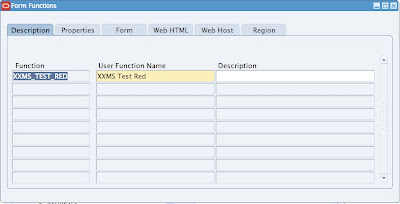
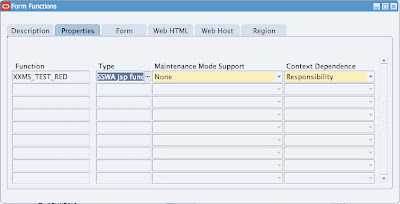
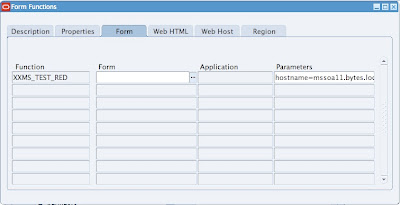
(hostname=mssoa11.bytes.local&port=7777&appnum=141&pagenum=1)
(hostname=apex_hostname&port=apex_port&appnum=apex_application_number&pagenum=apex_application_page_number)
Note: If you have no port number use 'null' for the port number.
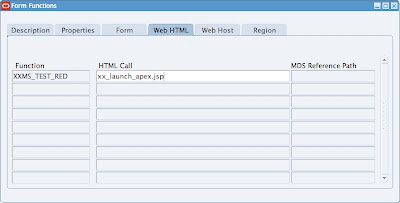 5. Add function to menu and launch!
1. Download the xx_launch_apex.jsp file here.
2. Copy xx_launch_apex.jsp to the $OA_HTML folder on the APPS application server. (Something like /u02/DEV/apps/apps_st/comn/webapps/oacore/html)
3. Compile the JSP.
- You can turn on autocompile: Metalink Note: 458338.1.
- Or you can run the following command as user applmgr:
perl -x /u01/app/oracle/TRAIN/apps/apps_st/appl/fnd/12.0.0/patch/115/bin/ojspCompile.pl --compile -s xx_launch_apex.jsp -conf /u01/app/oracle/TRAIN/inst/apps/TRAIN_trn82301/appl/admin/ojspCompile.conf –-flush
4. Set up function to use JSP. (Example below)


(hostname=mssoa11.bytes.local&port=7777&appnum=141&pagenum=1)
(hostname=apex_hostname&port=apex_port&appnum=apex_application_number&pagenum=apex_application_page_number)
Note: If you have no port number use 'null' for the port number.
 5. Add function to menu and launch!
Saturday, July 5, 2008
Oracle E-Business Suite on a Mac
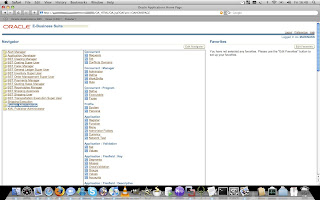
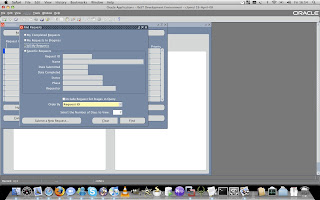
One of my first concerns as a Oracle developer when considering switching to a Mac was if I would be able to access Oracle E-Business Suite. (Or Oracle Applications as many may know it by) Even though the official Oracle E-Business suite blog (http://blogs.oracle.com/stevenChan/2006/08/18/) clearly states that is supports it, I know from previous experience that it can be quite a mission to work with Jinitiator (the java tool required to access Oracle forms), especially if you are a consultant and move between different sites who uses different versions of E-Business, and more importantly different Jinitiator versions. From different versions of Jinitiators that clash, to Firefox that don't recognize it, to Internet Explorer crashing on me, I always had problems on Windows, so surely getting it to work on a Mac must be quite a mission right? Wrong! Since E-Business on a Mac only uses Java and no Jinitiator its a breeze to use, and I could access E-Business with Safari without doing anything, or installing any plugins!

Apps Login screen
Find Concurrent Request

Shipping Transactions

Quoting Module

Workfow Monitor

Apps Login screen

Apps Navigation Menu

Find Concurrent Request

Shipping Transactions

Quoting Module

Workfow Monitor
After it was sooo easy to login to E-Business from Safari, I thought there is no chance of Firefox working so easily. I fired up Firefox and logged into E-Business again without having to install anything. Awesome!

Oracle Financials in Firefox

Oracle Financials in Firefox
Something I did pick up though which is very annoying is the default assignments of the F-keys in Mac OS X. Since its the default way to search in E-Business with the F11-key, but in Leopard's System Prefrences its set to Desktop. The easiest way to get rid of this problem is to go to System Preferences -> Keyboard & Mouse -> Keyboard Shortcuts -> Desktop, and deselect it.

My conclusion is that it is even easier to work on Oracle E-Business suite on Mac OS X than on Windows, and I would recommend any E-Business user who is thinking of switching, to seriously consider it!

My conclusion is that it is even easier to work on Oracle E-Business suite on Mac OS X than on Windows, and I would recommend any E-Business user who is thinking of switching, to seriously consider it!
Applications Versions Used:
Mac OS X Leopard: 10.5.3
Safari: 3.1.1
Oracle E-Business Suite: 11i
Java: build 1.5.0_13-119
Firefox: 3.0
Mac OS X Leopard: 10.5.3
Safari: 3.1.1
Oracle E-Business Suite: 11i
Java: build 1.5.0_13-119
Firefox: 3.0
Subscribe to:
Posts (Atom)